A fleet finder and CRM for established independent auto repair shops
Win Fleet Accounts for Your Established Auto Repair Shop
Fleet Searcher helps established independent shops find local companies with fleet vehicles, reach the fleet manager, and turn those conversations into accounts.
Built by Nathan Wade at Super Eagle Auto Care in Charlotte, where fleet accounts grew from two or three to more than 40.
Know which companies need a call, mail, email, or visit
Track calls, mail, email & visits in one place
Schedule the next touch using your shop’s follow-up rules
Actual CRM call screen · Sample company and conversation Click to enlarge ↗
1 systemCalls, mail, email, visits — all in one pipeline
4 outreach queuesCalling, Mail, Email, and Visits
Clear next stepsRecord an outcome and schedule the next action
Shared historyContacts, notes, and past activity by company
The Problem
Building fleet relationships takes more than a list of phone numbers.
📓
Leads tracked in notebooks and spreadsheets that only one person understands
⏰
A conversation ends, but the next call, mailing, email, or visit never gets scheduled
🔍
Contact names, direct numbers, and past conversations get lost between team members
📉
No way to see what your rep actually did this week — calls, visits, emails, mailings
Features
Fleet Prospecting Tools for Independent Repair Shops
Keep your fleet leads, the fleet managers you reach, your outreach activity, and next actions connected as you build relationships with local businesses.
📊
Core System
Pipeline & Activity Dashboard
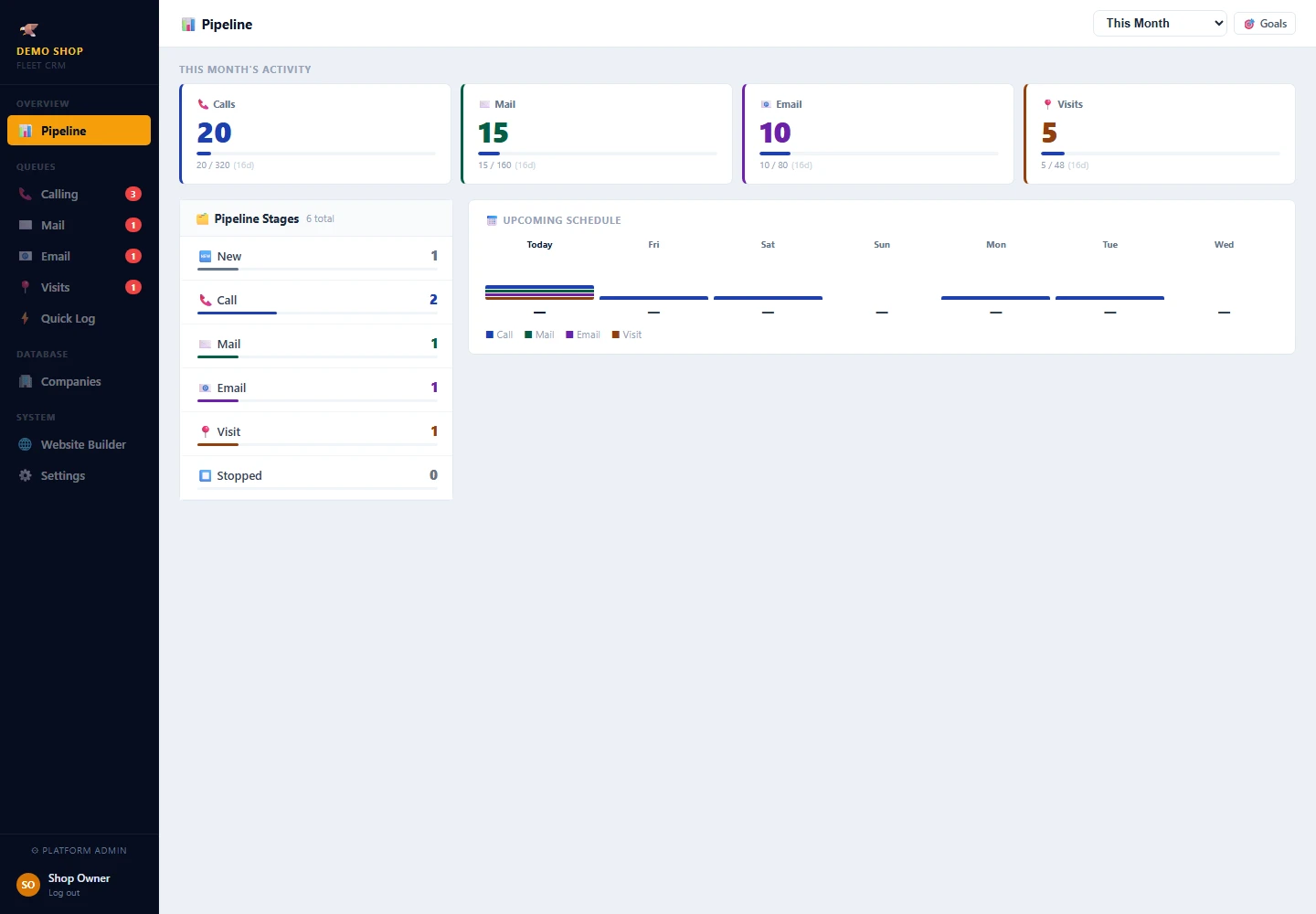
See company counts across New, Call, Mail, Email, Visit, and Stopped. Review recorded outreach activity, goal progress, and the upcoming schedule. Click a stage or an activity total to see the records behind it.
Move companies between queues using the stage buttons
Review due work and upcoming follow-ups
Open company records with contacts and activity history
Review activity by day, week, month, year, or custom dates
📅
Configurable Follow-Ups
Choose what happens after each conversation. Your shop’s rules set the follow-up timing, with a manual date override when needed. Schedule another call, mail, email, or visit — or stop outreach when appropriate.
📞
Calling Queue
Work the due call list using All Due, First Time, Follow-Up, and Overdue filters. Open a row to review the company, contacts, and history. Record what happened, choose the next action, and complete the call.
✉️
Mail & Email Tracking
Use dedicated Mail and Email queues to track outreach you send. Record the mail piece or email template, recipient details, outcome, notes, and next action. Keep the record with the company for the next conversation.
📍
Visit Queue & Route Planner
Open Visits to plan your day in Route Planner. Select scheduled stops, choose a starting point and departure time, adjust stop times, and plan a route. Find nearby companies and log the outcome of each visit.
⚡
Quick Log
Search for any company by name or phone number while signed in. Log a call, visit, mail, or email without starting from a queue. Capture the outcome, notes, and next action, and see what you have logged this session.
🎯
Activity Goals
Set daily goals for calls, mail, email, and visits. Review recorded activity over your selected date range, with goal progress adjusted for operating days. Open activity totals to see the underlying records.
🏢
Company Database
Add companies individually or import a CSV. Store business details, multiple contacts, preferred contacts, notes, and activity history. Filter by queue or by Prospect, Interested, Customer, and Stopped status.
How It Works
Keep the next conversation connected to the last one
From adding a prospect to planning the next touch, keep your team working from the same record.
01
Build Your Fleet Leads List
Add local companies with fleet vehicles in Companies, or import a CSV of new companies or call history. Keep phone numbers, addresses, contacts, and notes together so your team has a useful starting point.
→
02
Work the Due Outreach
Use Calling, Mail, Email, or Visits for the outreach you need to do. Review the company history before reaching out, filter the due work, and plan visit stops in Route Planner.
→
03
Record the Outcome & Next Action
Record what happened, add notes, and choose the next action. Follow-up dates use your shop’s configured rules unless you override the date. Quick Log is available for activity outside a queue.
→
04
Review Activity & Relationships
Review the Pipeline dashboard, activity totals, goals, and upcoming schedule. Update a company’s status as the relationship changes and keep the conversation history available to your team.
Call Logging & Conversation History
Log the Call. Remember the Person. Reopen the Conversation.
Finding the fleet manager is half the work. These actual CRM screens follow one sample call, from reaching the decision maker to reopening the notes later.
01 / LOG THE CALL
Keep what happened and who you spoke with together.
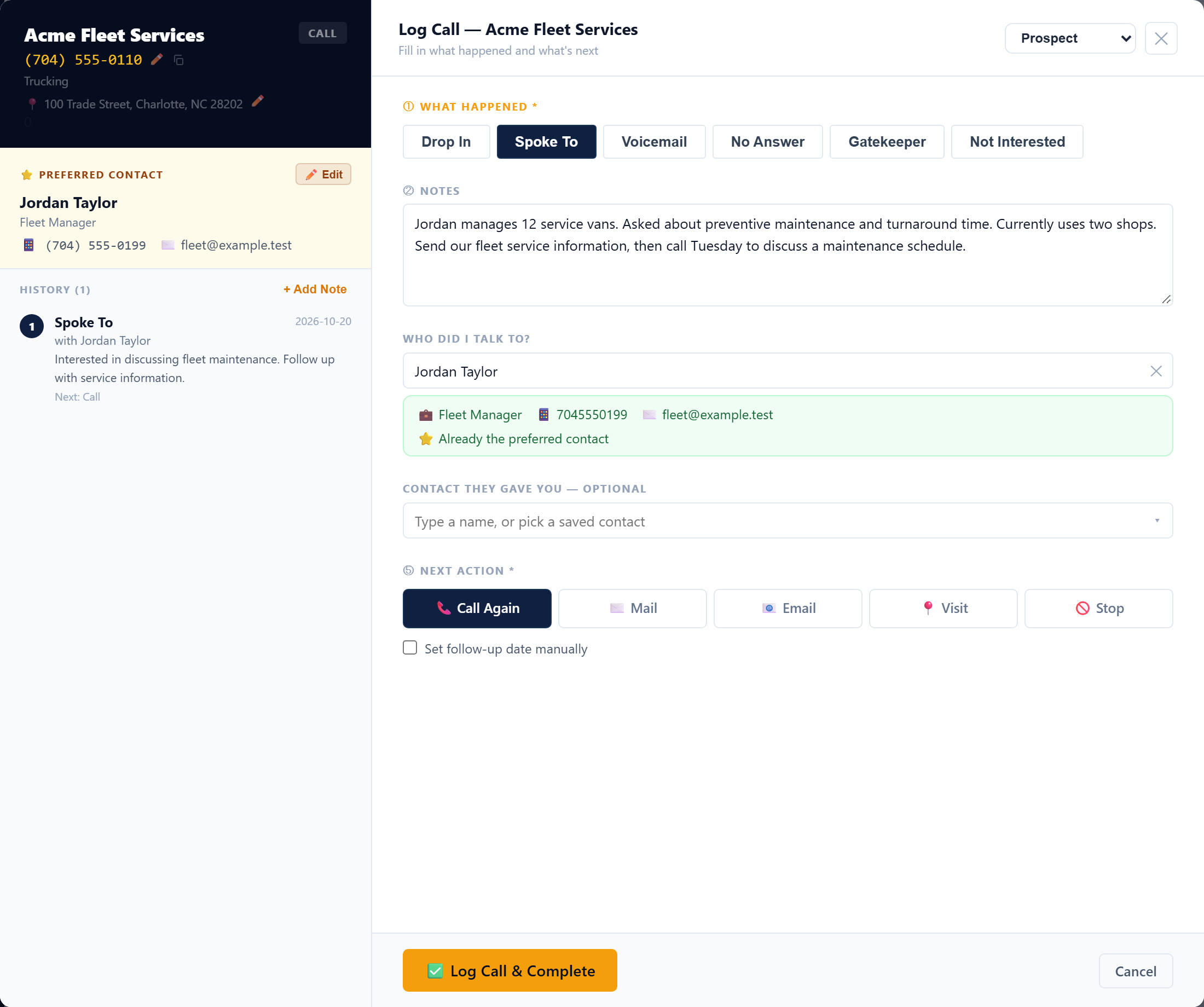
Open a company from Calling. Select the outcome under What Happened, then write down the conversation in Notes.
Under Who Did I Talk To?, choose a saved contact or enter the person’s name. Record their role and direct number when available. You can also record a contact they referred you to.
Choose the Next Action, then click Log Call & Complete. The saved call keeps the contact and your notes with the company.
The actual call form, filled with sample data. Click to enlarge ↗
02 / COME BACK TO HISTORY
See who you spoke with and when.
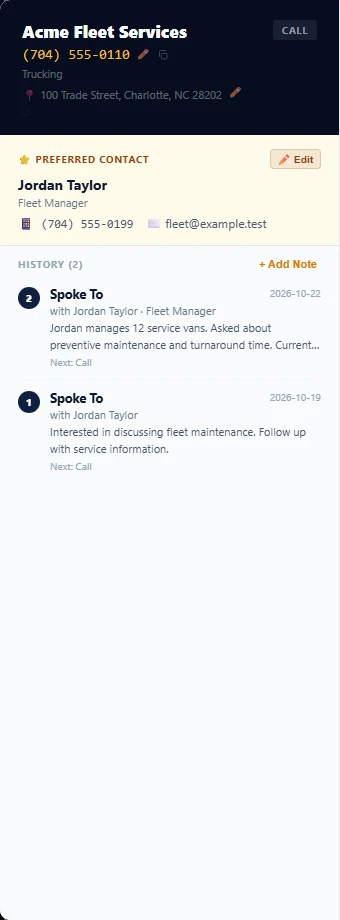
Reopen the company’s call panel. History shows the saved outcome, date, person, and a preview of your notes. In this example, the new call appears with Jordan Taylor · Fleet Manager.
Same company, after the call was saved.
03 / READ THE CONVERSATION
Open the entry to read your full notes.
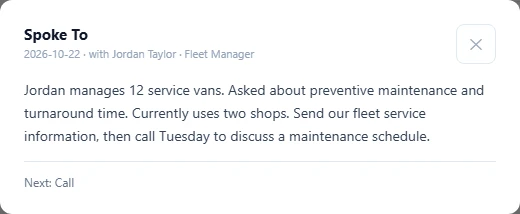
Click a History entry to reopen the conversation details. See the outcome, date, person you spoke with, full written notes, and next action before reaching out again.
The full note from that same sample call. Click to enlarge ↗
Your team can return to the written conversation history instead of trying to remember what was said.
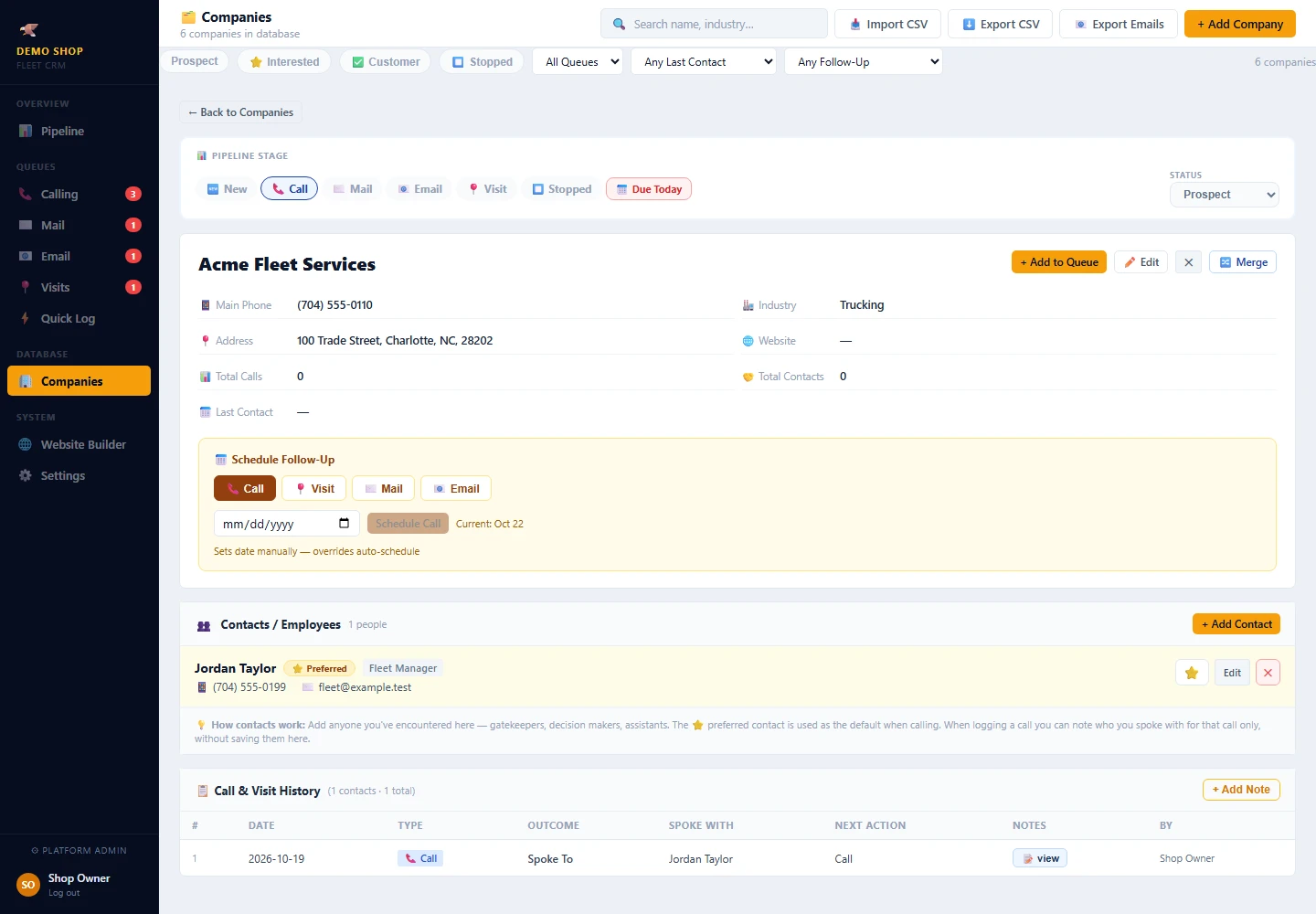
Actual Companies profile · Sample data Click to enlarge ↗
Next Actions & Follow-Ups
A Next Action for Each Company. A History Behind It.
Companies are organized into New, Call, Mail, Email, Visit, and Stopped. Click the stage buttons to send a company to the queue you want. Use the dashboard to review stage counts, then open a queue to work the due outreach. The screenshot shows the actual company profile and stage buttons, using a sample company.
When you complete an activity, the next action determines where the company goes next. Keep Prospect, Interested, or Customer status separate from the outreach queue so your team can see both the relationship and the next task.
Activity Tracking
See the Outreach Your Team Is Recording
Set daily goals for calls, mail, email, and visits, then review recorded activity for Today, This Week, This Month, This Year, or a custom date range. Goal progress reflects the operating days in the selected period.
Open an activity total to review the records behind it. Use the upcoming schedule to see what is due next, and use the company history to understand the conversations behind those numbers.
Actual Pipeline dashboard · Sample data Click to enlarge ↗
Simple Pricing
Your Shop’s Fleet Outreach, in One Place.
Core CRM tools for organizing companies, tracking outreach, and planning follow-ups.
Fleet Searcher
$199/month
A practical system for building fleet relationships
✅ Pipeline dashboard with stage counts and activity totals
✅ Calling queue with due-work filters and call logging
✅ Configurable outcomes and follow-up timing
✅ Mail, email & visit tracking
✅ Activity goals & progress tracking
✅ Company database with full contact history
✅ Quick Log for fast mobile logging
✅ Route planner for visit days
✅ Multiple contacts, preferred contacts, and company notes
Monthly subscription · Core CRM features listed above
Built Around Your Shop’s Follow-Up Process
Configure follow-up outcomes and timing in Settings. Add team members, manage their permissions, and set the default queue for imported companies.
Company records · Outreach queues · Follow-ups
Give Your Fleet Outreach a Place to Live.
Keep business contacts, outreach notes, due work, and next actions together so your team can follow through. Built by Nathan Wade at Super Eagle Auto Care, where fleet accounts grew from two or three to more than 40.
What is a fleet prospecting tool for an independent auto repair shop?
A fleet prospecting tool helps your shop organize the local businesses it wants to serve, the fleet managers and other people you contact, and your sales follow-ups. Fleet Searcher keeps company records, call notes, mail, email, visits, and next actions together so your shop can work toward building fleet service accounts.
How can Fleet Searcher help my shop find fleet customers?
Use Fleet Searcher to organize fleet prospects, build or import your company list, and manage the calls, emails, mail, and visits used to reach those businesses. Record each conversation and choose the next action so you know which prospects to follow up with.
Can my outside sales rep use Fleet Searcher?
Yes. Shop owners can add team members and manage their permissions. An outside sales rep can keep contacts, outreach notes, visit activity, and follow-ups in the CRM so the shop can review the same company history.
Is Fleet Searcher available throughout the United States?
Yes. Fleet Searcher serves independent auto repair shops across the United States. Your shop can organize outreach to businesses in its own service area, whether sales are handled by the owner or an outside sales rep.
Can I save who I spoke with and review the conversation later?
Yes. When logging a call, record the outcome, conversation notes, and the person you spoke with. The company history keeps the saved activity available so you can reopen the notes before your next conversation.
Can I import my existing company list and call history?
Yes. Fleet Searcher supports CSV imports for new companies and call history. Company records can include business details, multiple contacts, a preferred contact, notes, and activity history.
How do I find fleet leads for my auto repair shop?
Start with local companies with fleet vehicles near your shop that run the kinds of vehicles you already service, such as plumbing, HVAC, electrical, landscaping, pest control, and delivery businesses. Add each company to Fleet Searcher or import a CSV, then work your fleet leads through the Calling, Mail, Email, and Visits queues. Our guide on how to find fleet customers covers where to look.
How do I find the fleet manager or decision maker at a local company?
Ask who handles maintenance and repairs for the company vehicles. In a small business it is often the owner; in a larger one it may be an operations manager, office manager, or fleet manager. When you log a call in Fleet Searcher, record who you spoke with, their role, their direct number when available, and anyone they referred you to, so the next call goes to the right person. Our guide on how to find fleet manager email and contact information covers that in more detail.
Can I plan visits to local fleet prospects?
Yes. Open Visits to plan your day in Route Planner: select scheduled stops, choose a starting point and departure time, find nearby companies, and log the outcome of each visit.
How much does Fleet Searcher cost?
Fleet Searcher is a monthly subscription at $199 per month, including the core features listed in the pricing section.
Who built Fleet Searcher, and is it for a new shop?
Fleet Searcher was built by Nathan Wade, fleet manager and owner at Super Eagle Auto Care in Charlotte. He used this process to grow that shop from two or three fleet accounts to more than 40. It is meant for established independent auto repair shops, not brand-new shops and not for fleets as the customer.
How to spot companies with fleet vehicles near you, qualify the ones your shop can serve, and build a local target list from the road, maps, and public records.